Cotypist: AI Writing Assistant for Mac Users Who Want Faster, Cleaner Drafts (2026)
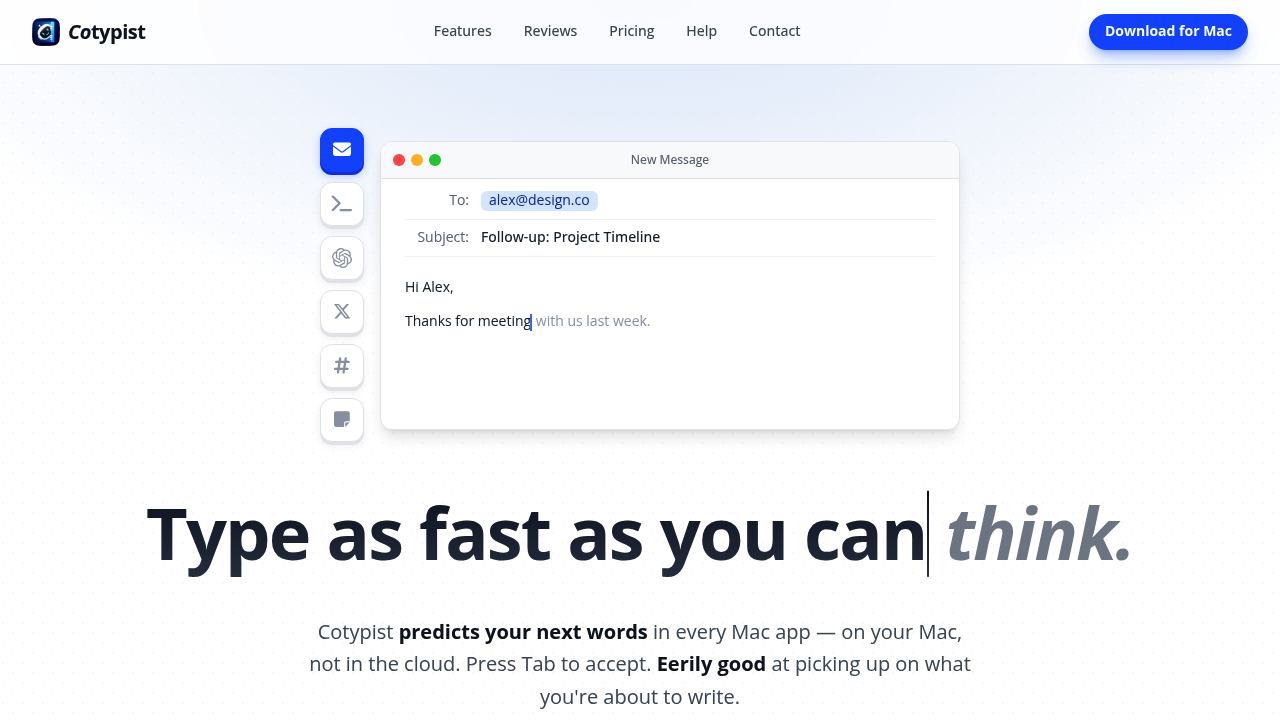
Cotypist is an on-device AI writing assistant by Accelerated Thought that predicts your next words inside Mac apps instead of pushing you into a separate chatbot or browser tab. Its main differentiator is workflow continuity: the tool stays inline, learns from your writing style over time, and keeps all processing on your Apple Silicon Mac.
It is best for people who write all day in short bursts across email, chat, notes, documentation, and prompt boxes, and who care more about speed and voice consistency than about generating finished long-form articles from scratch. The biggest advantage over cloud-first assistants is privacy plus zero context switching.
If you need a research-heavy AI writer that builds blog posts from keywords, outlines, or SERP data, Cotypist is the wrong pick. It helps you type what you were already trying to say, but it does not replace a full content generator, SEO optimizer, or collaborative editorial suite.
Cotypist: Key Specs at a Glance
| Feature | Cotypist |
|---|
| Primary use case | Inline AI autocomplete and typo correction across Mac apps |
| Best for | Writers, knowledge workers, and non-native English speakers who type all day on macOS |
| AI model | Not publicly documented |
| Editor type | Native macOS app that works inside other apps rather than a standalone web editor |
| Output types | Email, chat replies, notes, prompts, documents, social posts, and repetitive business writing |
| Template library | None documented |
| SEO features | None |
| Plagiarism check | None |
| Grammar check | Built-in typo detection on the free plan, fuller autocorrect on paid plans |
| Integrations | Works in most Mac apps; official examples include Apple Mail, Slack, Notion, Obsidian, browsers, Word, and Messages |
| Language support | Works across languages; official examples mention Norwegian and Hinglish |
| Collaboration | No team workspace or shared editing features documented |
| Pricing model | Free tier plus annual subscription plans |
| Free plan | Yes; 100 completed words per day |
| Paid plans | Plus at $6/month billed annually as $72; Pro at $9/month billed annually as $108; 30-day Pro trial included |
What Cotypist Does Well
It preserves writing flow better than prompt-first assistants
Cotypist's core strength is that it stays in the text field you are already using. That matters for support teams, operators, founders, and freelancers who lose time every time they jump to ChatGPT, rewrite the answer, and paste it back into Slack, email, or Notion.
For this kind of work, Cotypist behaves more like AI-powered sentence completion than content outsourcing. That makes it especially useful for repetitive daily writing where speed matters more than ideation.
Local processing is a real differentiator
The official site emphasizes that processing happens on your Mac rather than in the cloud. For people writing client emails, internal notes, or sensitive drafts, that privacy position is more compelling than the usual "AI assistant" pitch because it removes the question of whether every keystroke is being sent to a remote model.
That local design also changes the product's trust profile. Cotypist is easier to justify in environments where writers want AI assistance but do not want to paste private text into a browser chatbot.
It fits broad everyday writing, not just one format
Cotypist is not boxed into one content type. The official workflow examples cover email, Slack, support replies, prompts, documentation, and even novel drafting, which makes it more flexible than tools focused only on marketing copy or academic rewriting.
Because it adapts to your style and works inline, it is strongest when the same person writes across many apps during the day and wants one behavior pattern everywhere.
Known Limitations
- It only works on Apple Silicon Macs running macOS 14 or later, so Windows users and Intel Mac users are excluded completely.
- It is not a long-form content generator, so it will not replace tools that create blog posts, landing pages, or briefs from prompts and keywords.
- Some app support needs extra setup; the official FAQ calls out Google Docs accessibility mode and browser setting changes for Arc and Dia.
- It has no documented collaboration layer, approval flow, or shared workspace, which limits team-level editorial use.
- The paid plans are inexpensive, but there is no one-time purchase option documented, which may frustrate buyers who prefer perpetual licenses for utility software.
Best For: Who Should Use Cotypist
- Solo professionals who spend hours in email, chat, and notes and want less typing without changing their writing voice.
- Non-native English speakers who want inline help making phrasing sound more natural without sending text to a cloud editor.
- Support, operations, or customer success roles that write many short repetitive responses across the same set of apps.
- Prompt-heavy AI users who already work in ChatGPT, Claude, or coding-agent chats and want to type those prompts faster.
Who Should Look Elsewhere
- Writers who need an SEO content optimizer with briefs, keyword scoring, or SERP analysis.
- Marketing teams that want shared brand assets, approval workflows, or multi-user collaboration inside the writing tool.
- People who primarily want AI to produce complete first drafts rather than help them finish their own sentences faster.
Pricing & Cost at Scale
Cotypist has a clearer pricing model than many AI writing tools because it is not credit-based. The free tier gives 100 completed words per day, every install starts with a 30-day Pro trial, Plus costs $6 per month billed annually, and Pro costs $9 per month billed annually.
For a solo writer, that makes cost predictability excellent. There are no token packs, word-credit overages, or per-document charges documented on the official pricing page. The tradeoff is that value depends entirely on how much you type on a Mac rather than on how much AI-generated output you need.
- Casual user profile: the free plan can be enough if you mainly want light autocomplete and typo correction.
- Daily writer profile: Plus is the practical plan because unlimited completions on one Mac cost less than many browser-based AI subscriptions.
- Power user profile: Pro makes sense if you use multiple Macs and want the strongest personalization plus the full model catalog.
Prices are subject to change. Official pricing source: https://cotypist.app/pricing.
Integrations & Workflow Fit
Cotypist is best understood as a system-level writing layer, not a destination app. Officially documented app coverage includes Apple Mail, Slack, Notion, Obsidian, Safari, Chrome, Word, Messages, and many other text fields.
- Workflow fit: strong for cross-app writing on one Mac.
- API availability: not publicly documented.
- CMS or publishing integrations: not documented.
- Best deployment model: individual writer or operator, not a content team with structured publishing workflows.
What Users Are Saying
External discussion around Cotypist is positive but still early. The recurring theme is that it feels more natural than prompt-based writing assistants because it helps people finish what they were already typing instead of replacing the whole draft.
The main praise centers on speed, privacy, and how quickly the suggestions start matching a user's style. The likely frustration point is that people expecting a chatbot-style generator may find the product intentionally narrow.
Have you tried Cotypist? Share your experience in the review section below to help other writers decide whether inline autocomplete is a better fit than a prompt-first AI assistant.
FAQ
Is Cotypist free?
Yes. Cotypist has a free plan with 100 completed words per day, and every install starts with a 30-day Pro trial.
What types of writing does Cotypist help with?
It works best for short-to-medium everyday writing such as email, chat replies, notes, prompts, documentation, and repetitive business writing across Mac apps.
How does Cotypist compare to Grammarly?
It is narrower and more inline. Grammarly is stronger as a cloud-centric editing and correction layer, while Cotypist is better positioned as local autocomplete that finishes your sentences while you type.
Does Cotypist support languages other than English?
Yes. The official site says it works across languages and specifically mentions Norwegian and Hinglish, but it does not publish a full language list.
Is Cotypist good for SEO content?
No. It can help you type SEO drafts faster, but it does not offer keyword briefs, SERP analysis, optimization scoring, or search-intent workflows.
Is the output plagiarism-free or factually accurate?
Not necessarily. Cotypist predicts likely phrasing and helps with speed, but it is still AI assistance, so writers should review wording, facts, and originality before publishing important work.
Sources